
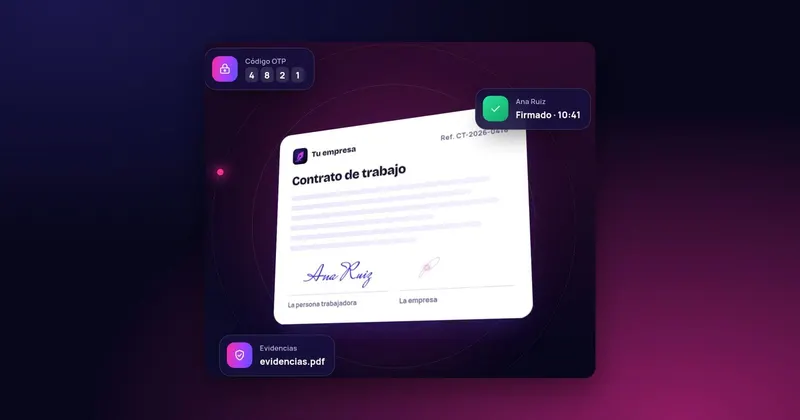
Hiring someone in another province, a crew starting tomorrow at a site far from the office, or a person who cannot drop in to sign before their first day is perfectly normal for many companies. The contract has to be signed, and often it has to be in writing. The good news is that nobody needs to travel: an electronically signed contract is a written contract. This article reviews what the law requires and how to organise remote signing without leaving loose ends.
What the Workers' Statute says about the form of the contract
Article 8 of the Estatuto de los Trabajadores (Spain's Workers' Statute, Real Decreto Legislativo 2/2015) starts from a broad principle: an employment contract may be made in writing or verbally. But paragraph 2 lists those that must be in writing, including:
- Training contracts (work experience, and training and apprenticeship).
- Part-time, permanent-discontinuous and relief contracts.
- Fixed-term contracts lasting more than four weeks.
- Those of people who work remotely, of fishermen, and of people hired in Spain to work abroad for Spanish companies.
- Any other contract where a legal provision requires it.
If a contract that had to be in writing is not, the law presumes it to be permanent and full-time, unless proven otherwise. And either party can demand that it be put in writing even once the employment relationship is under way.
In addition, article 8.5 requires the employee to be informed in writing of the essential elements of the contract when the relationship lasts more than four weeks and those elements do not appear in the written contract.
Why an e-signature meets the written-form requirement
The Statute does not require paper. It requires the contract to be in writing and signed. Regulation (EU) 910/2014 (eIDAS), in article 25.1, prevents a signature from being denied legal effect or admissibility as evidence solely because it is electronic. And Ley 6/2020 (Spanish law on electronic trust services), in article 3, gives private electronic documents the value appropriate to their nature. An employment contract signed electronically is therefore a written contract.
What you do need to look after is the evidence: if one day the person says they did not sign, or that the contract they signed said something different, you will have to prove it. Article 326 of the Ley de Enjuiciamiento Civil (Spain's Civil Procedure Act) sets out how an electronic document is challenged in court, which is why the record of the process matters as much as the signature itself.
Step by step: signing a contract remotely
- Prepare the contract in your management software with the person's details, the type of contract and the clauses. Check that the contact details and phone number are correct: you need them to send the document and, if you verify by SMS, the code.
- Send it for signing. The person receives it and opens it on their mobile, tablet or computer.
- Verify their identity before signing, for example with a one-time code sent by SMS to the phone number they gave you.
- Signature by both parties. The contract carries the signature of the company and of the employee; if anyone else is involved (a representative, or a guardian in a training contract), they can sign on the same document.
- Handing over a copy. The person must keep their own signed copy.
- Notification to the employment office. Article 8.3 of the Statute requires the content of contracts and their extensions to be notified to the public employment office within ten days of the contract being made.
- Basic copy. For contracts that must be in writing, article 8.4 requires a basic copy to be given to the workers' legal representatives within ten days of the contract being formalised (without ID number, home address, marital status or other data affecting privacy).
- Filing. Keep the signed contract, with its signature record, alongside the person's file.
What you must not skip
- The person must be able to read the whole contract before signing. Signing a summary page is not signing the contract.
- It must not be possible to alter it afterwards. If the document is edited after signing, the evidence is weakened. Any change should be detectable.
- The dates must add up. Signing the contract after the person has started work creates a gap that can cause problems. Send it with time to spare.
- The phone must be theirs. If you verify by SMS, the number must be the employee's, not a relative's or a supervisor's.
- Extensions and amendments in writing too. A signed extension avoids disputes about whether the contract ended or continued.
A practical example
Take a company with a campaign starting on Monday and 15 temporary hires of more than four weeks. With paper, someone has to print the contracts, gather the people, collect signatures and scan them. With remote signing, the HR department sends all 15 contracts from the management software, each person signs from their mobile, and the company sees in real time who has signed, who has opened it and who needs a reminder. By Monday, anyone who has not signed has been identified before work begins.
The signature does not replace the other formalities: registration with Social Security and notification of the contract are still required and follow their own channels. If you also have to keep the working time record for those people, that is a separate matter; at Infonet it is handled by Gesthoras.
How InfoSign does it
InfoSign sends the employment contract from your management software and the person signs with their finger or mouse from any device with a browser, with nothing to install. You can add OTP verification by SMS, have several people sign the same document (company and employee, for example) and follow the process in real time, with reminders if someone is late. Everything the person receives carries your logo and corporate branding.
When it is finished, the company receives the signed contract and its evidence document, with the document's digital fingerprint and the date and time of sending, opening and signing, and the document is digitised instantly on your server. It works equally well for extensions, payslips and ERTEs (temporary employment adjustment plans). See how it fits with your software in signing integrated with your ERP and what the evidence covers in legal validity.

 Test agreement