
The signed delivery note is proof that the goods arrived. When there is a dispute over missing packages, damaged material or a delivery the customer claims never to have received, that piece of paper is the first thing anyone looks for. And all too often it is crumpled up in a van cab, illegible or simply lost. Signing the delivery note on a mobile or tablet solves a good part of the problem. This article explains how to set it up.
What a signed delivery note proves
The delivery note records what was delivered, to whom and when. The recipient's signature turns that document into proof of acceptance: the customer acknowledges that they have received what the delivery note says. That is why it is the basis for invoicing without disputes and for resolving claims.
For it to be genuinely useful, the signature must be linkable to:
- A specific delivery note, with its number and lines, not a blank sheet of paper.
- An identifiable person: the name and, where appropriate, the ID number or job title of the person receiving the goods.
- A moment in time: the date and time of signing.
- Content that does not change after signing.
Problems with paper delivery notes
- They get lost, wet or torn before reaching the office.
- The signature is a scribble with no name and nobody knows who received the goods.
- Handwritten notes (“one pallet missing”, “box damaged”) are unreadable or never reach the admin team.
- The customer's copy and yours do not match because someone wrote on one and not the other.
- Until the driver gets back and someone scans the note, the admin team cannot invoice.
How to organise signing on a mobile
- The delivery note comes out of the management software with its number, customer, delivery address and goods lines.
- It is sent for signing to the recipient's device, or opened on the delivery driver's tablet so it can be signed on the spot.
- The recipient checks the whole delivery note before signing: lines, quantities and remarks.
- They sign with their finger on the screen.
- The signed delivery note returns to the company instantly, without waiting for the driver to come back.
- The admin team invoices with the signed delivery note already filed.
If the recipient is not present at the time of delivery (for example, the material is left at a site or an unstaffed warehouse), the delivery note can be sent to the person in charge so they can sign their acceptance from wherever they are, and the company can see when they opened it and whether they have signed.
There are two situations worth sorting out before you start. The first is incidents: if a package is missing or something arrives damaged, the right approach is to note it on the delivery note before signing, so that the customer signs for receipt “with remarks” rather than full acceptance. Agree with your customers how this is done and make sure the driver knows. The second is refusal to sign: if the customer does not want to sign, the driver should not insist or sign on their behalf; it is enough to record what happened and alert the office so it can be dealt with from there, for example by sending the delivery note to the customer's person in charge to review and sign.
Checklist before you roll it out
| Point | Question you should be able to answer |
|---|---|
| Who signs | Is it defined who can sign for receipt at each customer? |
| Incidents | How are shortages or damage noted before signing? |
| Several signatories | Is the carrier's or driver's signature also needed? |
| Customer copy | Does the customer receive their signed copy? |
| Filing | Is the signed copy stored together with the order and the invoice? |
| Training | Do drivers know what to do if the customer refuses to sign? |
Common mistakes
- Signing on a screen with no document. A stroke in an app that does not show the delivery note proves acceptance of nothing.
- Not capturing the signatory's name. An unidentified signature is worth little if the customer says that person did not work for their company.
- Leaving incidents for later. If the customer signs as satisfactory and later complains, the delivery note works in your favour; if there was real damage and it was not noted, the dispute becomes complicated for everyone.
- Changing the delivery note after signing. If quantities change, a new delivery note or a signed correction is issued.
- Relying on a photo of the paper. It is better than nothing, but it has no date, time or digital fingerprint of the document.
Other signatures related to transport
Besides the delivery note, other documents are signed in the carriage of goods, such as the consignment note. If you also need to issue the transport control document, Infonet has a specific application for that: DeCA. And if what you need is to generate delivery notes and invoice them, that is a job for your management software; the e-signature makes sure they come back signed.
Signing delivery notes and deliveries with InfoSign
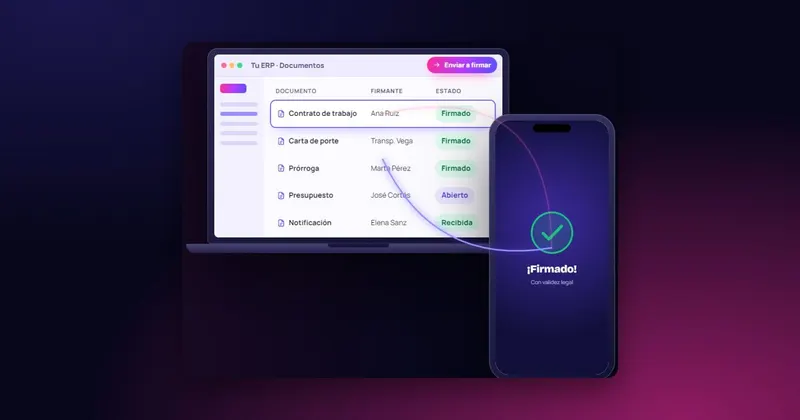
InfoSign lets you sign any document that comes out of your management software, from any device with a browser and without installing anything: the customer's mobile, the delivery driver's tablet or a computer. The signature can be handwritten, with a finger, and it supports several signatories on the same document. You can follow the process in real time and send reminders if someone has not signed.
The company receives the signed document straight away, together with its evidence document (the document's digital fingerprint and the date and time of sending, opening and signing), and it is digitised instantly on your server, ready to invoice. See how it connects with your software in signing integrated with your ERP or browse all the features.

 Test agreement